



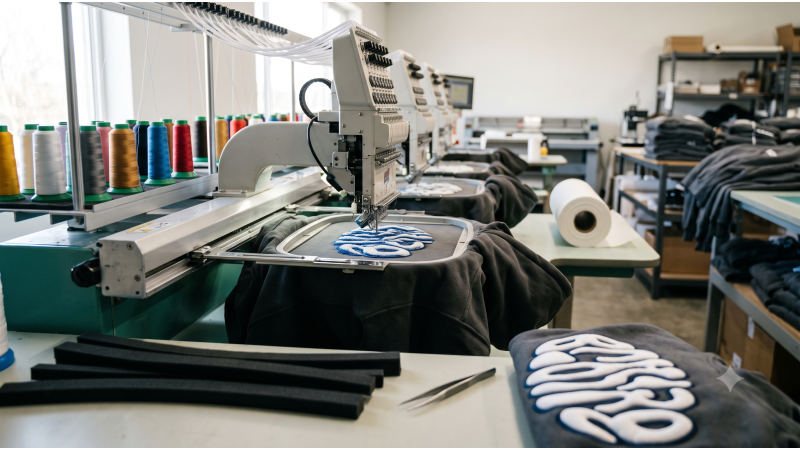
Quick answer: Good 3D puff embroidery files use bold, rounded shapes (strokes of at least about 2 to 3 mm), a tight cover satin laid over 2 to 3 mm foam, a perforating run under it, and extra pull compensation. On 400+ GSM hoodies, add a firm underlay, use cutaway backing, and slow the machine. Choose DST for most commercial machines, test on the real garment, and plan the foam cleanup before you quote.
Raised 3D puff lettering is the signature of streetwear. It sells on texture and perceived value, and it is also the style that punishes weak files fastest. On a heavyweight hoodie, a puff design that is too thin tears out of the foam, one that is too dense cuts the foam like a perforated stamp, and one that ignores the fleece underneath sinks, puckers and leaves bald edges. Every one of those failures lands on a garment that costs real money.
EmbDesignTube.com supplies production-ready, stitch-tested files for streetwear brands and custom shops. This guide explains how puff actually works, the digitizing rules that prevent cut-through, how to build for 400+ GSM fleece, which backing and needle to use, and how to clean up foam without damaging the stitching.
How 3D Puff Embroidery Works (and Why Files Differ)
3D puff is not a special file format. A puff design is an ordinary stitch file, DST or PES for example, digitized so that a dense satin stitch can be sewn over a layer of foam. The foam is placed over the area at a machine stop, the machine stitches the cover, and the foam outside the stitching is torn away afterward. The stitching does two jobs at once: it covers the foam and it perforates it so the scraps remove cleanly.
That is why a flat-embroidery file will not work for puff. Normal fills and thin satin lines cannot hold foam, and standard density can either leave foam showing or cut straight through it. Everything below comes from this one principle: the file has to build a stitched wall around the foam.
Core Digitizing Rules for 3D Puff
These are common starting points. Foam brand, thread, machine and garment all shift the result, so always confirm with a test stitch-out.
- Bold shapes only. Strokes thinner than roughly 2 to 3 mm will not hold foam. Choose rounded, heavy letterforms over thin scripts and fine serifs.
- Minimum letter height. Around 0.375 inch (9-10 mm) is a comfortable size. About 0.25 inch (6 mm) is a practical floor with a very bold font. Smaller than that, use flat embroidery instead.
- Cover satin density. Puff covers are stitched tighter than normal satin, commonly in the neighborhood of 0.25 to 0.35 mm line spacing. The goal is full coverage without slicing the foam.
- Perforating run. Add a tight run or short-stitch pass under the cover so the foam is pre-cut along the shape's edge and tears away cleanly.
- Column width. Keep satin columns in a workable range, roughly 2 to 8 mm. Wider areas can leave foam unsupported, so split them into sections or reconsider the shape.
- Rounded corners. Sharp points are hard to cover and hard to clean. Slightly rounded corners hold foam and strip better.
- Pull compensation. Dense satin over foam draws the shape inward. Add extra width, commonly a few tenths of a millimeter more than you would on flat satin, and scale it up for taller foam.
- Stitch direction. Run the satin across the narrowest dimension of each letter so the cover pulls evenly and the foam stays seated.
- Sequence for the operator. Put a clear machine stop before each puff element so foam can be placed, and finish flat details after puff elements so foam never covers them.
| Parameter | Typical starting point | If it goes wrong |
|---|---|---|
| Foam thickness | 2 mm standard; 3 mm for bold, large letters; 1 mm for finer detail | Thick foam on small letters tears out; thin foam looks flat |
| Stroke width | At least about 2-3 mm, more for 3 mm foam | Thin strokes pull foam away or leave gaps |
| Cover satin spacing | Roughly 0.25-0.35 mm | Too open: foam shows. Too tight: foam cuts through |
| Perforation | Tight run under the cover along edges | Missing: foam tears raggedly and pulls the stitching |
| Pull compensation | Extra width versus flat satin | Missing: letters shrink and edges go bald |
| Machine speed | Slow, often around 500-650 stitches per minute | Too fast: breaks and foam shift |
Preventing Cut-Through: The Most Common Puff Failure
Cut-through happens when the needle perforates the foam so heavily that the cover stitches fall away or the raised area collapses. It has three usual causes, and all are file or setup issues you can control.
- Density too high. Over-packed satin acts like a stamp. Open the spacing slightly or reduce overlap between adjacent columns.
- Needle too small or dull. A fresh sharp needle in the 80/12 to 90/14 range pierces cleanly. A dull point drags and tears the foam.
- Foam too thick for the shape. Narrow letters on 3 mm foam rarely hold. Match foam height to stroke width, or widen the letter.
The opposite problem, foam showing through the cover, usually means the density is too open, compensation is missing, or the foam shifted during stitching. Secure the foam with tape or a light tack at the stop, and check hooping tension before changing the file.
Building Puff Files for 400+ GSM Hoodies
Heavyweight fleece adds a second challenge underneath the foam. The pile swallows stitches, the knit stretches, and the garment shifts as the dense cover pulls. Treat the hoodie as part of the digitizing problem.
Underlay
- Use a firm edge-run plus a zigzag or lattice underlay under larger areas so the cover sits on a stable platform instead of sinking into the pile.
- Keep underlay stitches inside the shape edge so they do not show beyond the puff wall.
- Remember the rule from our other guides: thick or stretchy fabric needs stronger underlay and lighter top stitching, not the reverse.
Backing
- Use cutaway backing on every hoodie. A medium-weight cutaway, often around 2.5 to 3 oz, supports the dense cover. Tearaway lets the stitching loosen and the puff distort over time.
- For large back pieces, consider doubling the cutaway or using a firmer grade so the garment cannot ripple under the stitch field.
Hooping and setup
- Hoop firmly but do not stretch the fleece. Over-stretching returns to shape after unhooping and puckers the design.
- For thick garments, floating the hoodie over hooped backing with temporary adhesive can reduce hoop burn and keep the area flat.
- Clamp or tape sleeves, hood and drawstrings clear of the stitch field.
Size and placement
- Chest pieces commonly run about 3 to 5 inches wide. Large back pieces can be much bigger, but the bigger the puff area, the more the pull compensation and backing matter.
- Stitch count depends on the lettering. Puff text on a hoodie chest often falls in the low-to-mid thousands of stitches, and large back pieces run higher. Confirm with a test.
Looking for puff-ready lettering? Browse the EmbDesignTube design collection for bold, foam-ready typography and hoodie chest and back motifs, or send your artwork through our custom digitizing service for a puff-specific build.
Needles, Thread and Machine Settings for Puff
| Setting | Starting point | Why it matters |
|---|---|---|
| Needle | Fresh sharp, about 80/12 to 90/14 | Pierces foam and fleece cleanly; dull needles tear foam |
| Thread | 40 wt polyester or rayon | Strong enough to withstand a dense cover and trimming |
| Speed | Roughly 500 to 650 stitches per minute | Reduces thread breaks and foam shift |
| Tension | Balanced, not tight | Over-tight tension pulls the cover into the foam and cuts through |
| Foam color | Match or closely match the thread | Hides tiny foam remnants at edges |
| Backing | Cutaway, about 2.5-3 oz | Holds the dense stitch field stable |
These are starting points, not guarantees. Record the settings that pass your test stitch-out and keep them with the file.
Foam Cleanup: Protect the Stitching and Your Labor Cost
Cleanup is where puff jobs quietly lose money. A design that takes twelve minutes to stitch and fifteen to clean is a pricing problem you should know about before quoting.
- Tear in the right direction. Pull foam away from the shape, along the perforation, with steady pressure instead of snatching.
- Use tweezers for corners and counters. Small enclosed areas, like the inside of an O or A, need precise removal.
- Trim stray fragments. Small curved scissors help with edge remnants. Be careful not to nick the cover stitches.
- Consider light heat for residue. Some shops pass a heat gun briefly over tiny leftover foam to shrink it. Test on a scrap first and keep the heat moving, since fleece and polyester thread can scorch or melt.
- Design for easy cleanup. Rounded corners, adequate perforation and open counters cut cleanup time more than any tool.
- Time the first article. Include stitch time plus cleanup time when you price repeat orders.
Hybrid Designs: Combining Puff With Flat Stitching
The strongest streetwear pieces mix raised lettering with flat details such as outlines, small icons, borders and shadows. A few rules keep hybrids clean:
- Stitch puff elements first, clean the foam, then stitch flat details so nothing is buried.
- Keep fine details away from the foam edge. Leave a small gap so flat stitching does not ride up the puff wall.
- Use flat embroidery for anything below the minimum stroke or letter size, such as taglines and small marks.
- For varsity looks, pair puff lettering with layered patches and appliqué. See our appliqué and patch bulk designs for ready-to-run sets.
File Formats for Puff Designs: DST, PES and EXP
Buy the format your machine reads natively. DST covers most commercial controllers including Tajima, Barudan and Ricoma. PES suits Brother PR machines, and EXP suits Melco. Because puff relies on exact stitch order and stops, avoid converting between formats on the shop floor. For a detailed format comparison, read our commercial embroidery designs DST PES guide. If you also run caps, puff on structured buckram has its own sequencing rules, covered in our commercial DST embroidery designs for caps guide.
Puff Troubleshooting Guide
| Problem | Likely cause | Fix |
|---|---|---|
| Foam shows through the cover | Spacing too open, no compensation, or foam shifted | Tighten spacing slightly, add compensation, tape foam securely |
| Foam cut through, letters look flat | Density too high, dull needle, tension too tight | Open density, fit a fresh sharp needle, ease the tension |
| Letters peel or tear away | Strokes too thin or foam too thick | Widen the shape or use thinner foam |
| Bald edges and gaps | Missing pull compensation | Add width and check hooping tension |
| Hoodie puckers around the design | Weak backing, over-tight hooping, heavy density | Use cutaway, hoop without stretching, reduce overlap |
| Foam fragments stay in corners | Weak perforation or sharp corners | Add perforation and round the corners |
| Frequent thread breaks | Speed too high, dull needle | Slow the machine and replace the needle |
Why Streetwear Brands Choose EmbDesignTube
- Puff-aware digitizing: bold shapes, perforation and compensation planned for foam, not copied from flat files.
- Built for heavy fleece: underlay and backing guidance for 400+ GSM hoodies.
- Commercial formats: DST, PES, EXP, JEF and EMB for Tajima, Barudan, Ricoma, Melco and Brother systems.
- Instant download or custom build: run a stock design today, or send your lettering to our digitizing service.
- Direct support: ask about puff files on WhatsApp, Telegram, or the contact page.
Custom or Ready-Made Puff Files?
For a brand's own wordmark, custom puff digitizing is usually worth it, because shape, foam height and letter spacing have to be tuned to the artwork. For stock varsity alphabets, block lettering and common chest or back motifs, ready-made files save time and are already stitched out. If you are weighing the two, our guide to buying embroidery designs for commercial use covers cost per piece, turnaround and licensing checks.
Related Reading
- Commercial Embroidery Designs DST PES: Production File Guide
- Commercial DST Embroidery Designs for Caps: Stitch Guide
- Left-Chest Embroidery Designs for Uniforms: Stitch Count Guide
- Buy Embroidery Designs Commercial Use: Custom vs Pre-Digitized
Frequently Asked Questions
Can you do 3D puff embroidery on a hoodie?
Yes. Puff works well on heavyweight hoodies when the file is built for it. Use bold shapes, a firm underlay so the cover does not sink into the fleece, cutaway backing, a fresh sharp needle and a slower machine speed. Always run a test stitch-out on the actual hoodie before a full order.
What is the minimum letter size for 3D puff embroidery?
Around 0.375 inch (9-10 mm) tall is a comfortable minimum for puff lettering, and about 0.25 inch (6 mm) is a practical floor with a very bold font. Strokes should be at least roughly 2 to 3 mm wide. For smaller text or fine detail, use flat embroidery instead.
Why does my 3D puff foam show through or tear out?
Foam showing through usually means the cover density is too open, compensation is missing, or the foam shifted. Foam tearing out usually means strokes are too thin, the foam is too thick for the shape, or the density cuts through. Adjust shape width, foam height and density, and test again.
Which file format should I use for 3D puff embroidery designs?
Use the format your machine reads natively. DST works on most commercial machines such as Tajima, Barudan and Ricoma, PES suits Brother and Baby Lock, and EXP suits Melco. Puff is built into the stitch design, not the format, so choose a file digitized for foam and avoid converting between formats.
Ready to stitch cleaner puff? Browse all EmbDesignTube designs, or contact our team to find the right puff file for your machine and garment.